Microsoft Copilot at Work: Hands on in Outlook, Teams, Word, Excel and PowerPoint
Use Microsoft 365 at work? This is hands on Microsoft 365 Copilot training on the real screens, so you get real value from Microsoft Copilot whether your organisation has the full licence or free Microsoft Copilot Chat.
Microsoft Copilot at Work is an 83 minute video course from Capytech for office and admin staff. It costs £49 inc VAT, is sold on its own (it is not part of All Access) and ends with a certificate.
For: Office and admin staff, Managers and team leaders, Public sector and council teams, Anyone with Microsoft 365 at work
Watch a preview of Microsoft Copilot at Work
A preview of Microsoft Copilot at Work, our video course: Microsoft Copilot on the real screens in Outlook, Teams, Word, Excel and PowerPoint, with clips from five of its 32 lectures. It runs for 1 minute 14 seconds, with captions.
By the end, you will be able to
- Catch up on a 14 message email thread in one prompt, and check every point against the emails
- Turn a Teams meeting into a recap with owned actions you have checked
- Go from your rough notes to a first draft in Word, then make changes you can review in Edit mode
- Ask questions of a spreadsheet in Excel and check every number by hand
- Build a deck from your Word document in PowerPoint and keep it on brand
- Build your own agent, and use Researcher for in-depth research
- Know what free Microsoft Copilot Chat and the Microsoft 365 Copilot licence can each do
How do you use Microsoft 365 Copilot well at work?
Give Microsoft Copilot the job, the source and what a good answer looks like, then check what comes back before you use it. With the Microsoft 365 Copilot licence it can find what it needs in your emails, files, meetings and chats, but only things you can already open. With free Microsoft Copilot Chat you bring the work in yourself, by pasting text or uploading a file.
- Find your label first: Microsoft shows which version you have at the top of the Microsoft Copilot pane, and that decides what you can do.
- Outlook: summarise a long thread in one prompt, then open the markers that link each point back to its email.
- Teams: turn on transcription before the meeting, ask questions during it and check the actions and owners in the recap afterwards.
- Word and PowerPoint: draft from your own notes, use Edit mode for changes you can review, and build a deck from a Word document.
- Excel: format your data as a table, ask questions of it and check every number by hand before it goes anywhere.
- Agents: use Researcher for in-depth research, and build a simple agent of your own from clear instructions.
Microsoft Copilot at Work is a video course with 32 lectures in nine sections. You follow Grace at a fictional district council on the real screens, try every prompt on the practice files, and finish with a short quiz in each section and a certificate.
Real screens, real answers
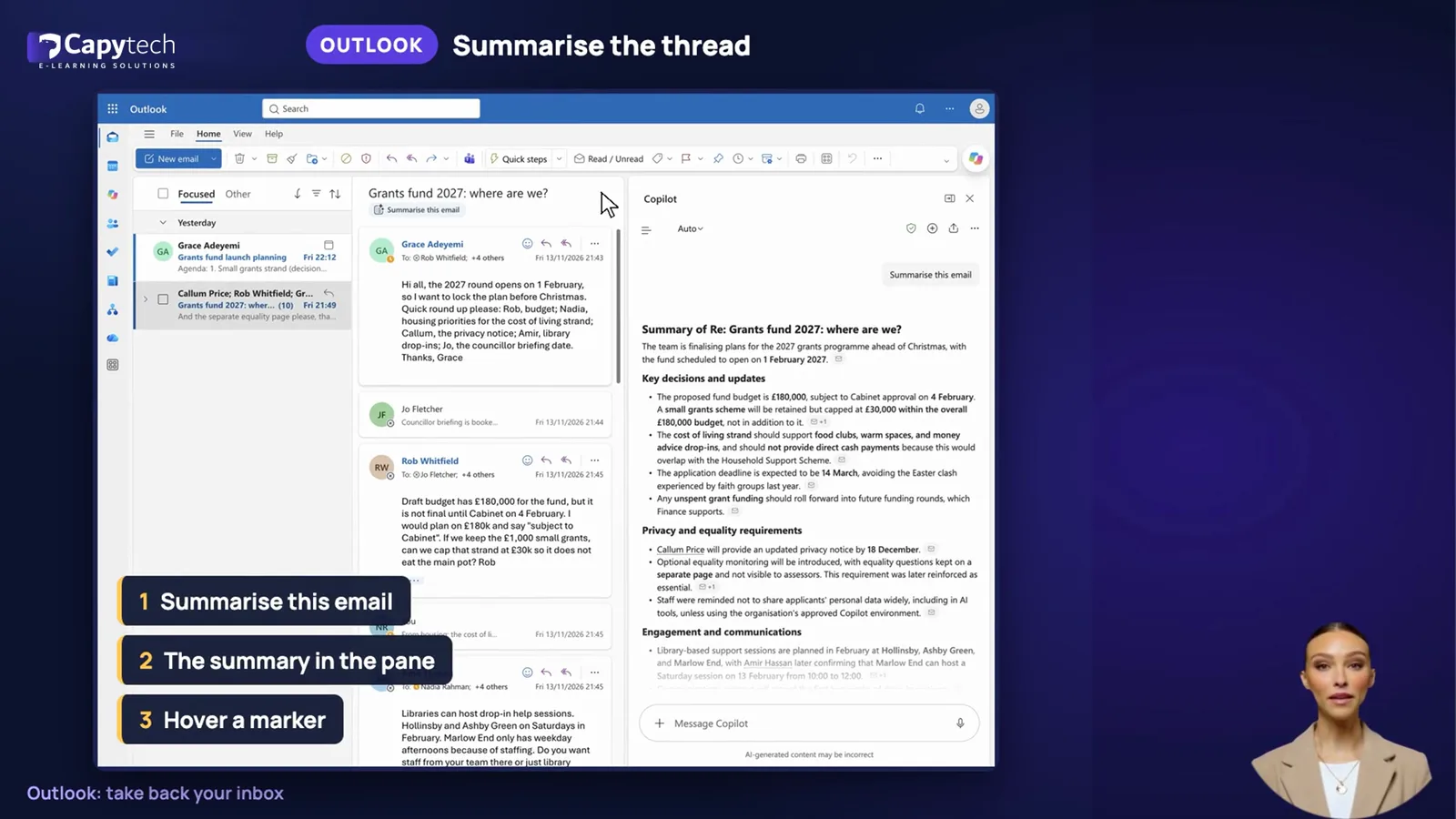
Outlook: Microsoft Copilot summarises a 14 message thread, with markers back to each emailStills from the course
Nine sections, 32 short lectures
1WelcomeWhat Microsoft Copilot can do for your day, how the course works, and the council grants fund whose launch you follow.
3 lectures, 7 min
- 1.01
What Microsoft Copilot can do for your working daySee how Microsoft Copilot takes the first pass at reading, drafting and sorting while you check and decide.
3 min - 1.02
How this course worksLearn how to build along with the practice files, how to tell from the label in your apps which version of Microsoft Copilot you have, and how each lecture is marked free Microsoft Copilot Chat or licence.
2 min - 1.03
Meet Grace and the grants fundMeet Grace, the Hollinsby Community Grants Fund 2027 and the pile of work that stands between her and launch.
2 min Section quizFive questions with feedback, 80% to pass
2Know your Microsoft CopilotWhere Microsoft Copilot lives, what each version can see, how your data is protected and how to prompt it.
4 lectures, 11 min
- 2.01
One assistant, many placesFind Microsoft Copilot in its own app and inside Outlook, Teams, Word, Excel and PowerPoint, and read your label.Works with free Microsoft Copilot Chat
3 min - 2.02
Free Microsoft Copilot Chat or the full licence?See what free Microsoft Copilot Chat can use, what the paid licence adds, and how Work IQ changes the answer.Partly free Microsoft Copilot Chat, partly the licence
3 min - 2.03
Your data, your permissionsLearn how enterprise data protection covers your prompts, and why sharing permissions decide what gets surfaced.Works with free Microsoft Copilot Chat
3 min - 2.04
Prompts that work in Microsoft CopilotWrite stronger prompts with Goal, Context, Source and Expectations, then ask for changes instead of starting again.Works with free Microsoft Copilot Chat
3 min Section quizFive questions with feedback, 80% to pass
3Outlook: take back your inboxCatch up on long threads, draft and coach replies, and triage your inbox with a check at every step.
4 lectures, 11 min
- 3.01
Catch up on a long threadSummarise a 14 message email thread in Outlook, then use the markers and Sources to check each point.Works with free Microsoft Copilot Chat
3 min - 3.02
Draft a reply in secondsDraft Grace's reply to Jo with Help me reply, change its tone and length, and check the facts before you send.Works with free Microsoft Copilot Chat
3 min - 3.03
Get coaching before you sendUse Get coaching on a blunt email for feedback on tone, reader sentiment and clarity, then ask for a calmer draft.Works with free Microsoft Copilot Chat
3 min - 3.04
Triage and schedule with Microsoft CopilotPrioritise your inbox with reasons you can check, and book a meeting by naming people in full.Needs the Microsoft 365 Copilot licence
3 min Section quizFive questions with feedback, 80% to pass
4Teams: meetings and chatsSet up transcription, ask questions in a meeting, check the recap and catch up on busy channels.
4 lectures, 10 min
- 4.01
Before the meeting: Microsoft Copilot and transcriptionSet recording, transcription and Microsoft 365 Copilot as separate meeting options, then tell people out loud.Needs the Microsoft 365 Copilot licence
3 min - 4.02
Ask Microsoft Copilot during the meetingAsk Microsoft 365 Copilot private questions during a live Teams meeting, and make them specific enough to help.Needs the Microsoft 365 Copilot licence
2 min - 4.03
The recap and your actionsCheck the recap's owners, dates and amounts, then draft a follow up that flags anything unclear.Needs the Microsoft 365 Copilot licence
3 min - 4.04
Catch up on chats and channelsSummarise a busy chat or channel, learn its limits, and open the original message for any decision that matters.Partly free Microsoft Copilot Chat, partly the licence
2 min Section quizFive questions with feedback, 80% to pass
5Word: from notes to a finished documentTurn rough notes into a draft, make changes you can review, rewrite for your reader and test the result.
4 lectures, 10 min
- 5.01
A first draft from your notes and filesTurn rough notes and last year's policy into a first draft of the guidance, with every gap marked to check.Needs the Microsoft 365 Copilot licence
2 min - 5.02
Edit mode: changes you can reviewUse Edit mode to restructure the draft, then check its list of changes against the figures and dates.Needs the Microsoft 365 Copilot licence
3 min - 5.03
Rewrite for your readerRewrite a section for residents by naming the reader, then confirm every fact and figure has survived.Partly free Microsoft Copilot Chat, partly the licence
3 min - 5.04
Summarise and pressure-testSummarise the guidance in Chat only, then ask Microsoft Copilot to challenge it the way a councillor would.Partly free Microsoft Copilot Chat, partly the licence
2 min Section quizFive questions with feedback, 80% to pass
6Excel: answers from your dataGet your data ready, ask questions of it, build formulas and charts, and check every number by hand.
4 lectures, 10 min
- 6.01
Get your data ready for Microsoft CopilotFormat the applications data as a table with headers and save it to OneDrive, so it is ready for questions.Needs the Microsoft 365 Copilot licence
2 min - 6.02
Ask questions of your dataAsk specific questions of the grants spreadsheet, then check a ward total yourself with a filter and the Sum.Needs the Microsoft 365 Copilot licence
3 min - 6.03
Formulas, highlights and chartsAdd a formula with a plain English explanation, highlight rows and build a chart, checking how your words were read.Needs the Microsoft 365 Copilot licence
3 min - 6.04
Check every numberCheck every number with an independent sum, use Show Changes to see what was edited, and chase any mismatch.Needs the Microsoft 365 Copilot licence
3 min Section quizFive questions with feedback, 80% to pass
7PowerPoint: a deck from your documentBuild a councillor deck from your Word guidance, keep it on brand and polish it before it goes out.
3 lectures, 8 min
- 7.01
Build a deck from the Word guidanceTurn the Word guidance into a councillor deck by naming the source, the audience and the eight slide limit.Needs the Microsoft 365 Copilot licence
3 min - 7.02
Keep it on brandBuild the deck on the council template so it keeps its layouts, then check every slide for personal details.Needs the Microsoft 365 Copilot licence
2 min - 7.03
Polish, summarise and presentAdd a slide, make an image from slide content, and use a Chat only summary to test the story the deck tells.Needs the Microsoft 365 Copilot licence
3 min Section quizFive questions with feedback, 80% to pass
8Agents: Microsoft Copilot that works for youMeet Microsoft's own agents, use Researcher and Analyst, build a helper and keep a project in one notebook.
4 lectures, 10 min
- 8.01
What an agent isLearn what an agent is, which agents come free or with the licence, and what to check before you add one.Partly free Microsoft Copilot Chat, partly the licence
2 min - 8.02
Researcher and AnalystUse Researcher for a source cited report and Analyst for your own spreadsheet, then check what each gives you.Needs the Microsoft 365 Copilot licence
3 min - 8.03
Build your own agentBuild a Grants FAQ helper in Agent Builder from a plain description, then test it with a question it should refuse.Partly free Microsoft Copilot Chat, partly the licence
3 min - 8.04
Keep a project together with Notebooks and PagesGather a project's sources in a notebook, then turn an answer into a page your team can edit together.Partly free Microsoft Copilot Chat, partly the licence
2 min Section quizFive questions with feedback, 80% to pass
9Make it stickFive habits for safe, useful work, a way to save and share prompts, and your plan for Monday.
2 lectures, 5 min
- 9.01
Your Microsoft Copilot habitsLearn five habits for safe, useful work, then save your best prompt and share it with your team in Prompt Lab.Works with free Microsoft Copilot Chat
3 min - 9.02
Summary and your next stepLook back at the grants launch and write a Monday plan: one task, one app, one prompt and one check.
2 min Section quizFive questions with feedback, 80% to pass
You follow Grace, a communications manager at Hollinsby District Council, as she uses Microsoft 365 Copilot to launch a community grants fund. Every answer on screen is Microsoft Copilot's real output from the prompts in the course. Hollinsby District Council, its grants fund and everyone in it are fictional.
Everything in the box
Everything you need to follow along on your own screen, ready to download and keep.
- Prompt pack
27 copy ready prompts in lecture order, each with the app, the licence it needs and its practice file.
- Practice files
The email thread, meeting transcript, notes, policy, spreadsheet and slide template used on screen.
- Which Microsoft Copilot do I have?
The three labels explained, and every lecture marked free Microsoft Copilot Chat or licence.
- Safe use checklist
Account, data, meetings, checking and fairness: the habits to tick off before anything leaves your hands.
- Section quizzes
A short quiz after each section, with feedback on every answer.
- A check at every step
Every lecture ends by checking the answer against the source, the way you would at work.
- Captions
English captions on every lecture, so you can watch with the sound off.
- Your plan for Monday
The last section helps you pick the habits and prompts to use in your first week.
Know what your version can do
- Every lecture is marked: works with free Microsoft Copilot Chat, needs the Microsoft 365 Copilot licence, or partly both
- Current to November 2026: the Microsoft Copilot app, Work IQ, Edit mode in Word, Researcher and Analyst
- A check at every step: you open the source and confirm names, dates and numbers before anything goes out
- Your data stays inside your organisation's Microsoft 365 permissions, and the course shows how to keep it that way
Made for people at work
For anyone whose organisation uses Microsoft 365 and has switched on Microsoft Copilot, from office and admin staff to managers and team leaders. You follow Grace, a communications manager at a fictional district council, as she launches a community grants fund, and you try every step on the same practice files.
- Office and admin staff
- Managers and team leaders
- Public sector and council teams
- Anyone with Microsoft 365 at work
- New Microsoft Copilot users
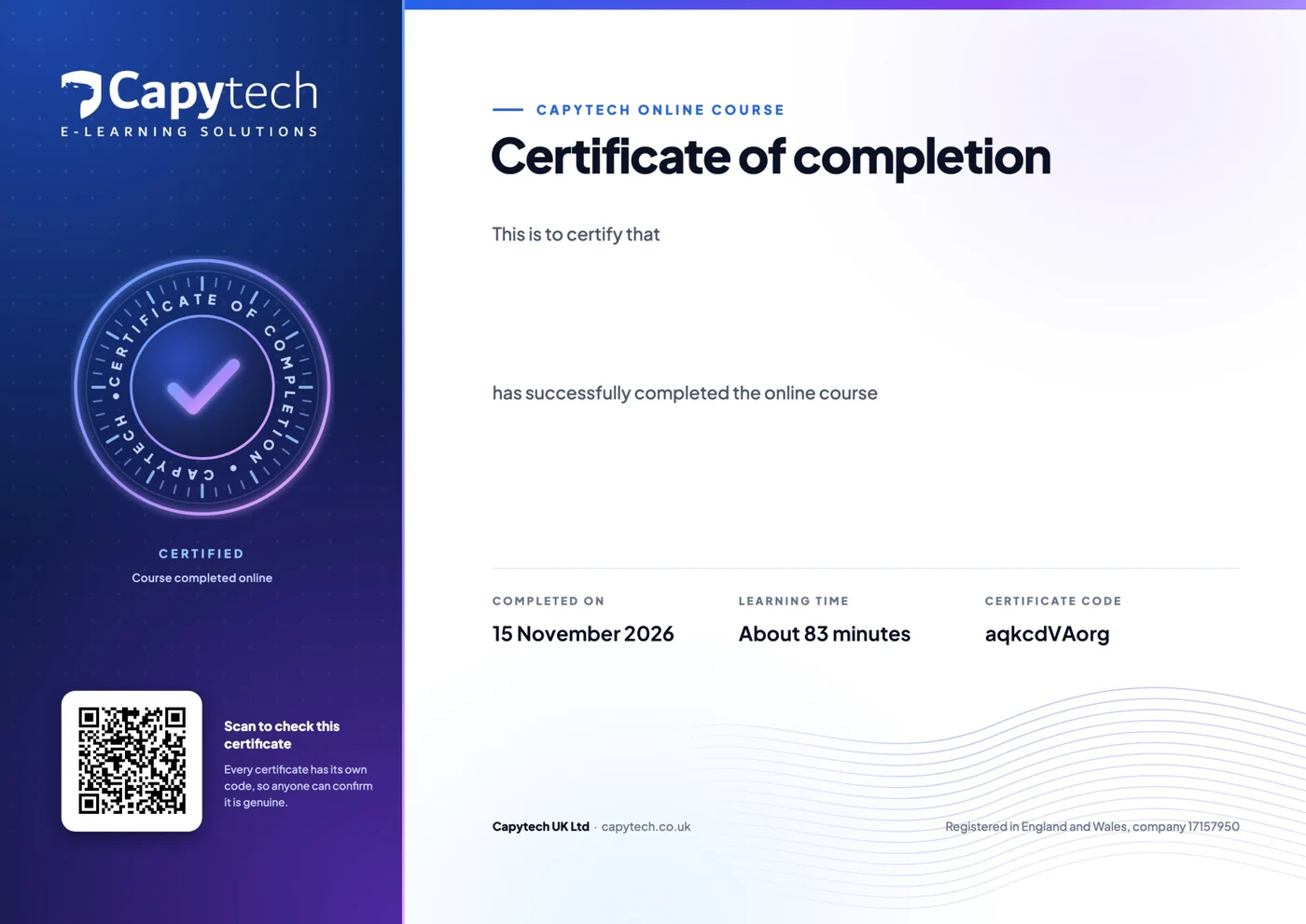
Your certificate of completion
Watch every lecture and pass each section quiz at 80%, then download a PDF certificate with your name, the course, the date and a verification code anyone can check.
Want the AI courses too?
Get All Access (30 AI courses) and Microsoft Copilot at Work together for £60 inc VAT, instead of £78 separately. You save £18.
Use AI in the rest of your work too
Our interactive AI courses take about 20 minutes each. Start with the free one.
 20 minYour AI tool
Microsoft Copilot in Your Day
Microsoft Copilot in Word, Outlook, Teams, Excel and PowerPoint: what to ask it and what to check.
£9£7.50 ex VAT 20 minStart here
Prompting That Works
Structure, context, examples and iteration: get useful answers from any AI tool, first time.
£9£7.50 ex VAT 20 minStart here
AI Safety and Data Protection
Shadow AI, confidential data, prompts as personal data and the approved tools rule, under UK GDPR.
£9£7.50 ex VAT 20 minAI skills
AI for Spreadsheets and Data
Formulas, cleaning, analysis and charts with AI help, in Excel and Google Sheets.
£9£7.50 ex VAT
Questions, answered
We answer every message ourselves, usually the same working day.
Do I need a Microsoft 365 Copilot licence?
Not for all of it, and every lecture is marked. Seven lectures work with free Microsoft Copilot Chat, including catching up on a long email thread, drafting replies and getting coaching on an email. Seven work partly with free Microsoft Copilot Chat and partly need the licence. Fourteen need the Microsoft 365 Copilot licence to follow on screen: triage and scheduling in Outlook, the Teams meeting lectures, drafting and Edit mode in Word, the Excel and PowerPoint sections, and Researcher and Analyst. The four welcome and wrap up lectures are for everyone. Without the licence you can still watch those lectures to see what is possible, and the sheet "Which Microsoft Copilot do I have?" lists every lecture.
How do I know which version I have?
Microsoft shows a label at the top of the Microsoft Copilot pane, for example in Word or Excel. One label means free Microsoft Copilot Chat, one means standard access without the paid add-on, and Premium means you have the Microsoft 365 Copilot licence. Lecture 2.02 and the downloadable sheet explain all three.
Is it the same as Microsoft Copilot in Your Day?
No. Microsoft Copilot in Your Day is our 20 minute interactive course: what to ask Microsoft Copilot in each app and what to check, and it is part of All Access. Microsoft Copilot at Work is the in-depth video course: 32 lectures, about 83 minutes, hands on in each app with practice files.
Which Microsoft Copilot course should I take?
We have three. Microsoft Copilot in Your Day is a 20 minute interactive taster for £9 inc VAT, and it is in All Access. You've Got AI at Work. Now What? is our in-depth interactive course for beginners: nine units, about 2 hours 15 minutes, with a recipe for each everyday task that also works in ChatGPT, Gemini or Claude, for £49 inc VAT. This course is the video one: 32 short lectures on the real screens, with practice files. Choose it to watch each feature in action, and the interactive course to learn by doing, step by step.
Is this course part of All Access?
No. Microsoft Copilot at Work is a separate video course at £49 inc VAT. All Access covers our 30 interactive AI courses. If you want both, the All Access + Microsoft Copilot at Work package gives you all of them together for one lower price.
Is it up to date?
Yes. It was made in November 2026 and shows the current Microsoft Copilot app, Work IQ, Edit mode in Word, Excel and PowerPoint, and Researcher. Microsoft changes Microsoft Copilot often, so we check the course every month and update it when something changes.
Is my organisation's data safe?
The course shows how Microsoft Copilot works inside your organisation's Microsoft 365. Signed in with your work account, enterprise data protection is on, and Microsoft Copilot only finds files and messages you can already open. It also covers what not to share and how to check who can see a file, with a safe use checklist to keep.
Do I get a certificate?
Yes. Watch every lecture and pass the short quiz at the end of each of the nine sections, with 80% to pass and as many tries as you need. Then download your certificate of completion as a PDF with a verification code anyone can check.
Can I get a refund?
Yes, if you have not started the course: ask within 14 days of buying and we will refund you in full. Once you start the course the sale is final. Your statutory rights are not affected.
How long do I have access?
12 months from the day you buy, including the prompt pack, the practice files, the downloads and any updates we make in that time. The downloads are yours to keep.









Get more from Microsoft Copilot this week
£49 inc VAT (£40.83 ex VAT), with 32 video lectures, the prompt pack and 12 months access.
Want it for your team or clients? Talk to us.